UI / UX Design
Dashboard Redesign
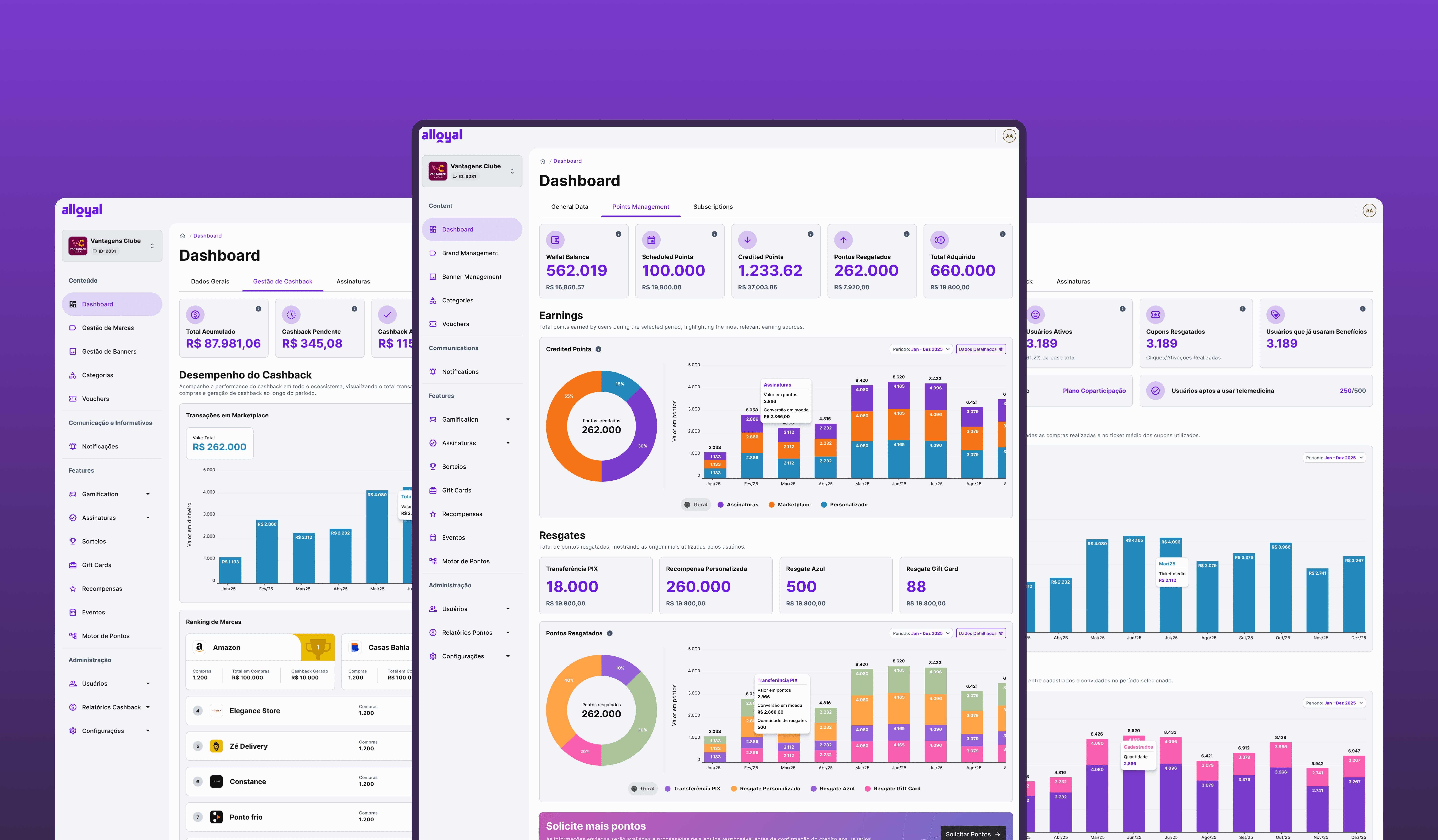
What happens when the platform’s most important dashboard is no longer trusted by its users? This case explores the redesign of an admin dashboard that struggled with low adoption, fragmented information, and operational dependency. As part of a broader product rebranding initiative, the challenge was not only to modernize the experience but also to rebuild confidence in data, improve decision-making, and create a scalable foundation for future growth. From discovery to implementation, this project demonstrates how strategic design can transform a dashboard from a neglected feature into a valuable business tool.
Year :
2024
Industry :
Tech
Client :
Alloyal
Project Duration :
2 Years
Context & My Role
Where I fit in
Alloyal is a B2B loyalty platform that manages subscriptions, points programs, or cashback for corporate clients across Brazil. The admin panel is the primary interface for client companies to track their program's performance, effectively the main product touchpoint for decision-makers on the client side.
MY ROLE
Lead Product Designer, sole designer on the dashboard track, working directly with the PM and two engineers.
Collaborators
Product Manager · 2 Engineers · Customer Success team (5 CSMs) · Data team (for metric validation)
My Scope
Discovery · Information Architecture · UI Design · Design System · Handoff & QA
The redesign was part of a broader admin panel rebranding initiative. I was responsible for the end-to-end design process, from running research sessions to delivering production-ready components through a Design System I created from scratch.
Problem
A dashboard no one trusted
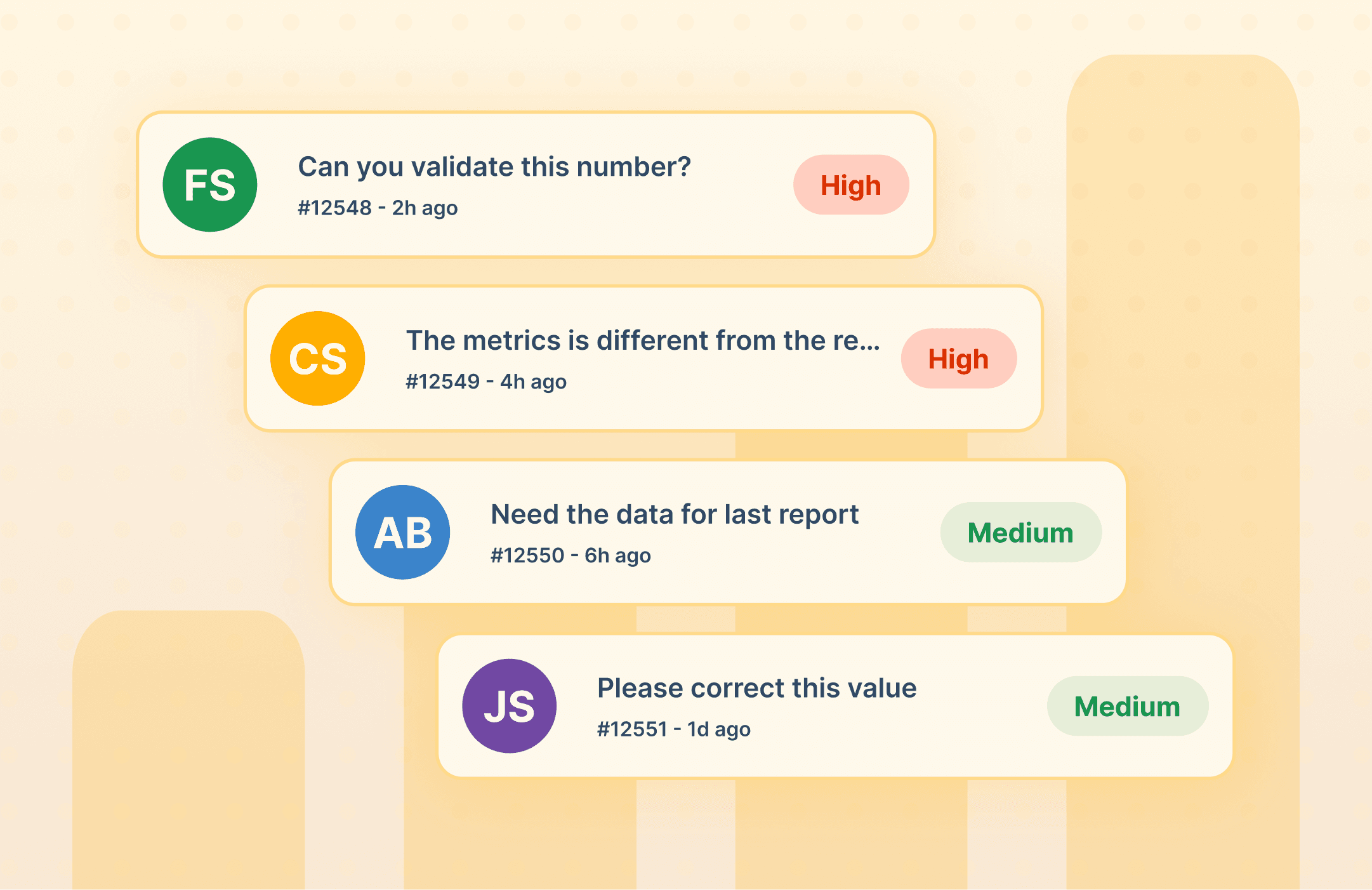
The initial analysis revealed five critical and interconnected failure points. The problems weren't isolated, they formed a cascade: metric errors eroded trust, which drove users away, which pushed volume to Customer Success, which leaned on external tools to compensate.



THE CORE Insight:
Clients weren't lazy, they were rational. When a tool can't be trusted, people route around it. Every ticket to CS was evidence of a design failure, not a user failure.
Goal
Reposition the dashboard as a product asset
The redesign had a clear strategic intent: make the dashboard something clients chose to use because it made them better at their jobs, not a feature they tolerated.
Single source of truth
Eliminate data discrepancies between the dashboard and CS reports
Self-service tool
Clients should be able to answer their own data questions without calling CS
Reduce CS load
Free up Customer Success from reactive data support to strategic conversations
Scalable foundation
Design System as infrastructure to support future analytics expansion
Single source of truth
Eliminate data discrepancies between the dashboard and CS reports
Reduce CS load
Free up Customer Success from reactive data support to strategic conversations
Self-service tool
Clients should be able to answer their own data questions without calling CS
Scalable foundation
Design System as infrastructure to support future analytics expansion
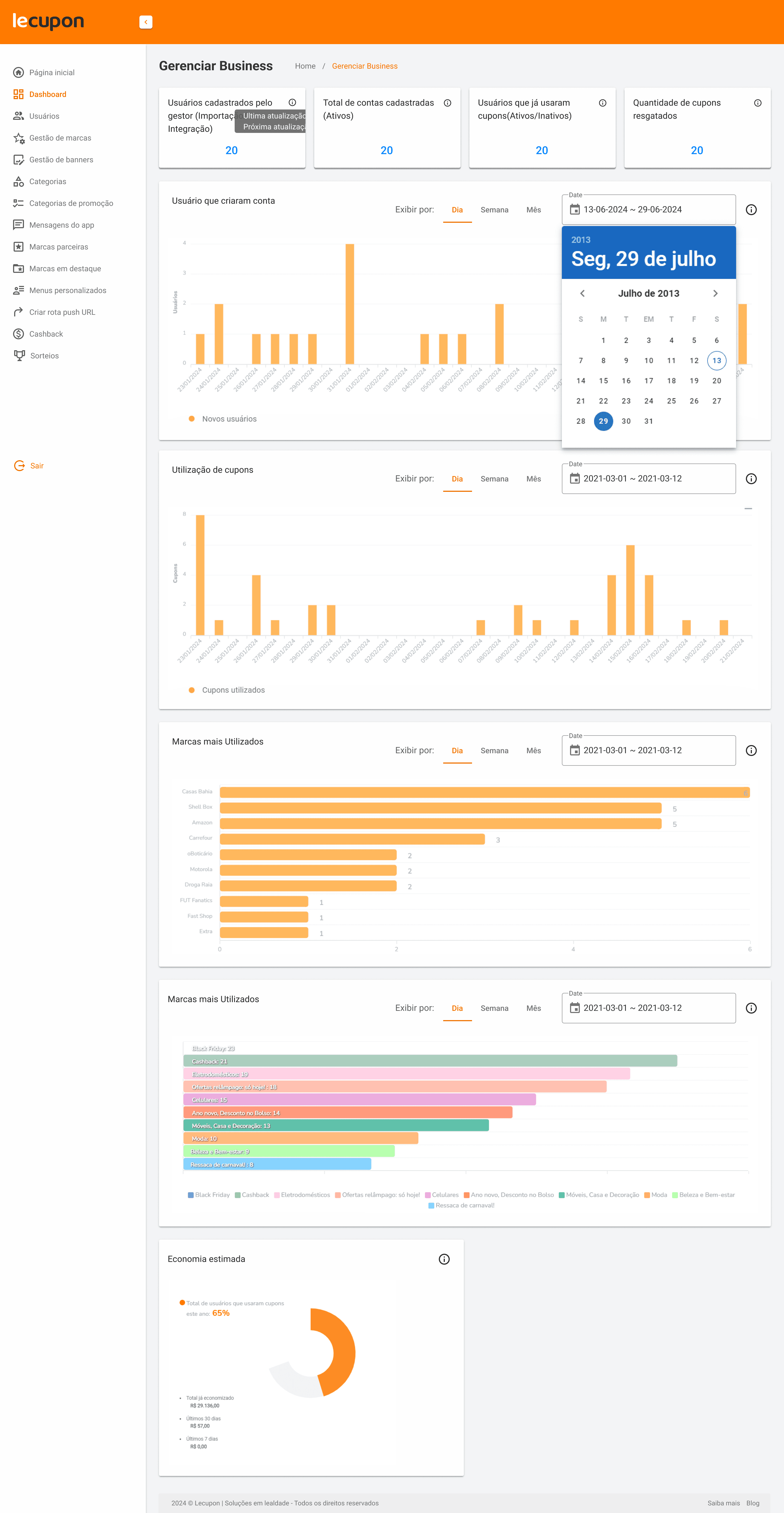
Dashboard Old version
Discovery
Understanding where trust broke down
Before touching any layout or component, I needed to understand exactly where the data pipeline was failing and how that shaped user behavior. I ran a three-pronged discovery over three weeks.
Method 01 · Stakeholder interviews
CS team deep-dive
Interviewed 4 Customer Success Managers individually. Asked them to walk me through a typical client data request: what was asked, what they had to look up, why they couldn't point the client to the dashboard.
"I open Looker first because I know the numbers there are right. Then I open the dashboard to show the client where to find things later, but I know the numbers won't match."
— CSM, interviewed in discovery
Method 02 · Client sessions
5 client interviews
Recruited 5 active B2B clients (HR managers at mid-to-large companies) for 45-minute sessions. Observed them trying to answer real business questions using the existing dashboard. Tracked where they got stuck, what they expected to find, and when they gave up.
"I wanted to know how many points were about to expire this month. I couldn't find it, so I sent a WhatsApp to our account manager."
— Client, HR Manager at a retail company
Method 03 · Data cross-check
Metric audit with the data team
Together with a data analyst, I mapped every metric shown in the dashboard against its calculation logic and compared it to the equivalent in Looker. Found 7 discrepancies — 3 were critical (churn rate, active subscriber count, cashback utilization rate).
Key Finding
The biggest discrepancy was in how "active subscriber" was defined. The dashboard counted any subscription created in the period; Looker counted only those with at least one transaction. A ~30% difference in the same number.
Method 04 · Ticket analysis
Support ticket categorization
Analyzed 3 months of CS tickets tagged as "dashboard" or "data question." Categorized them by topic and mapped them to specific screens. This gave me a prioritization map: which data gaps or errors caused the most friction.
The top 3 ticket drivers were
Churn interpretation (34%), points expiration visibility (28%), cashback reconciliation (21%).
Discovery output:
A prioritized list of metric inconsistencies, a map of the most-requested data not available in the dashboard, and a clear picture of the two main user journeys (client reviewing program health vs. CS preparing a client report). These became the backbone of the IA redesign.
Approach
Five bets we made
1
Data validation with real stakeholders
Cross-checked every metric with the CS team and data team before redesigning anything. Redefined calculation logic for the 3 critical metrics in collaboration with engineering.
→ Outcome: clear metric definitions agreed upon across CS, Product, and Engineering
2
Information architecture redesign by product domain
Reorganized the dashboard around three product domains (Subscriptions, Points, Cashback) with a clear separation between strategic KPIs and operational data. Applied progressive disclosure: overview → details.
→ Outcome: clients could navigate to their specific area without scanning the entire screen
3
Expanded data coverage per domain
Added dedicated dashboards for each domain addressing the top ticket drivers: churn relative to active base (not absolute), points expiration timeline, cashback reconciliation view.
→ Outcome: the three top ticket categories now have self-service answers in the product
4
Client autonomy features
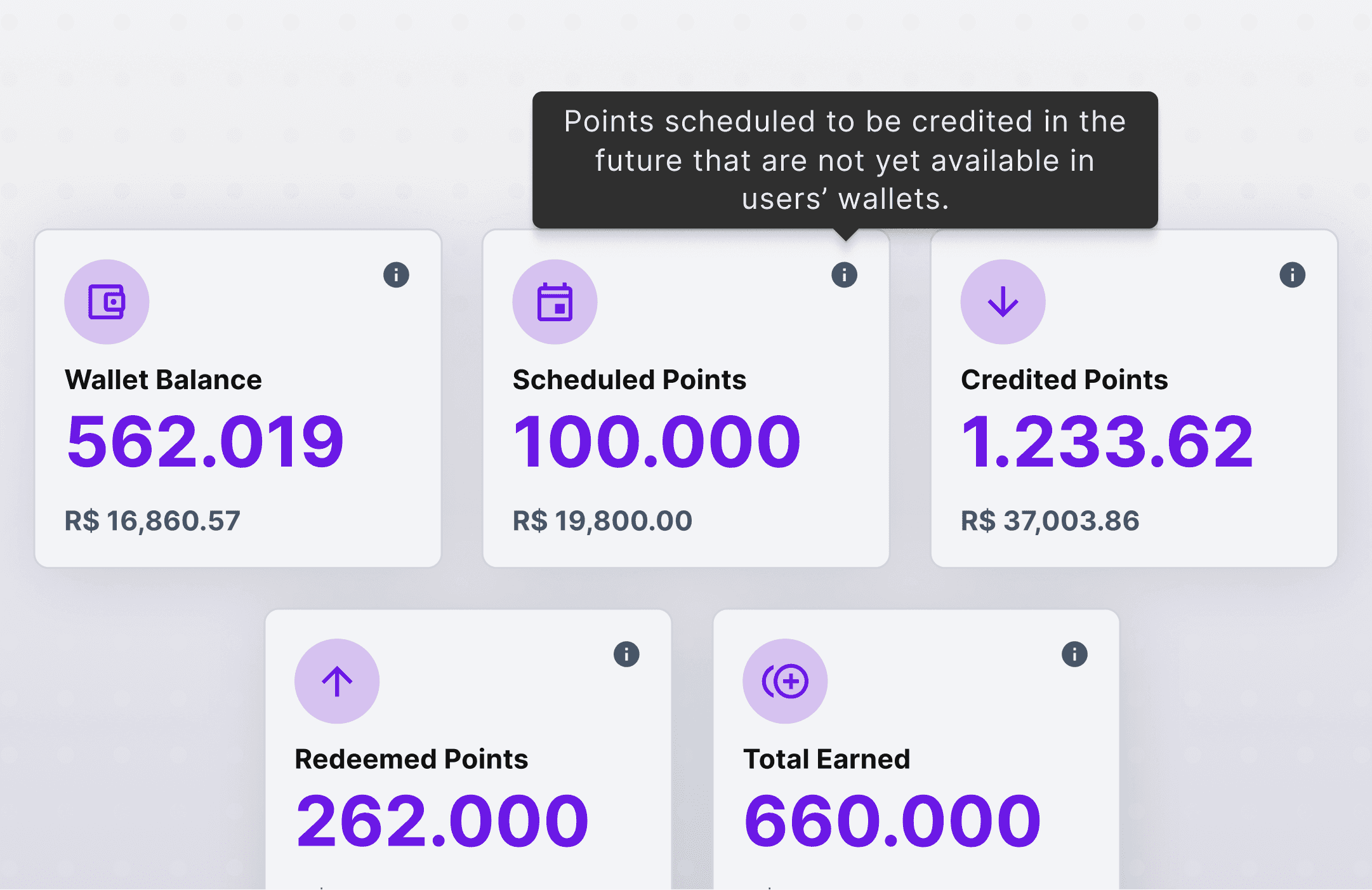
Added CSV export, period comparison controls, and contextual tooltips explaining metric definitions. The goal was to reduce the need to call CS even for edge cases.
→ Outcome: clients can now run their own ad-hoc analysis without CS involvement
5
Design System as the rebranding backbone
Created a dedicated Design System to ensure consistency across all three dashboard domains and the white-label environment. Standardized components, chart styles, typography, and all states (error, empty, loading).
→ Outcome: new dashboard modules now take ~40% less design time due to reusable foundations
Key Design Decisions
Three decisions that shaped the outcome
These weren't obvious calls, each one involved a trade-off and a choice that could have gone differently. Here's the reasoning behind the ones that mattered most.
DECISION 01
Show churn as % of active base, not as an absolute number
ALTERNATIVES CONSIDERED
DISCARDED
Absolute churn count
DISCARDED
Period-over-period delta only
WHY WE CHOSE THIS
Clients with 500 subs and 50 churned read it differently than those with 5,000 and 50 churned. The % framing made the same number actionable regardless of program size, and matched how clients actually talked about their business in interviews.
DECISION 02
Domain-first navigation (Subscriptions · Points · Cashback) over a unified overview
ALTERNATIVES CONSIDERED
DISCARDED
Single scrollable dashboard
DISCARDED
Tab-based all-metrics view
WHY WE CHOSE THIS
Discovery showed clients were product-specific: an HR manager running a points program didn’t care about cashback metrics. A unified view forced them to visually filter every time. Domain-first reduced cognitive load and made the page feel relevant to each persona from the first click.
DECISION 03
Build the Design System before shipping the dashboard, not after
ALTERNATIVES CONSIDERED
DISCARDED
Ship dashboard first, DS later
DISCARDED
Adopt an existing open-source system
WHY WE CHOSE THIS
Three domains shipping without a shared foundation would inevitably drift, undermining the consistent, reliable perception we needed to rebuild. Doing the DS first also paid off immediately: the Cashback domain shipped ~40% faster. I mapped that gain against the 3-week investment and the PM aligned.
SOLUTION
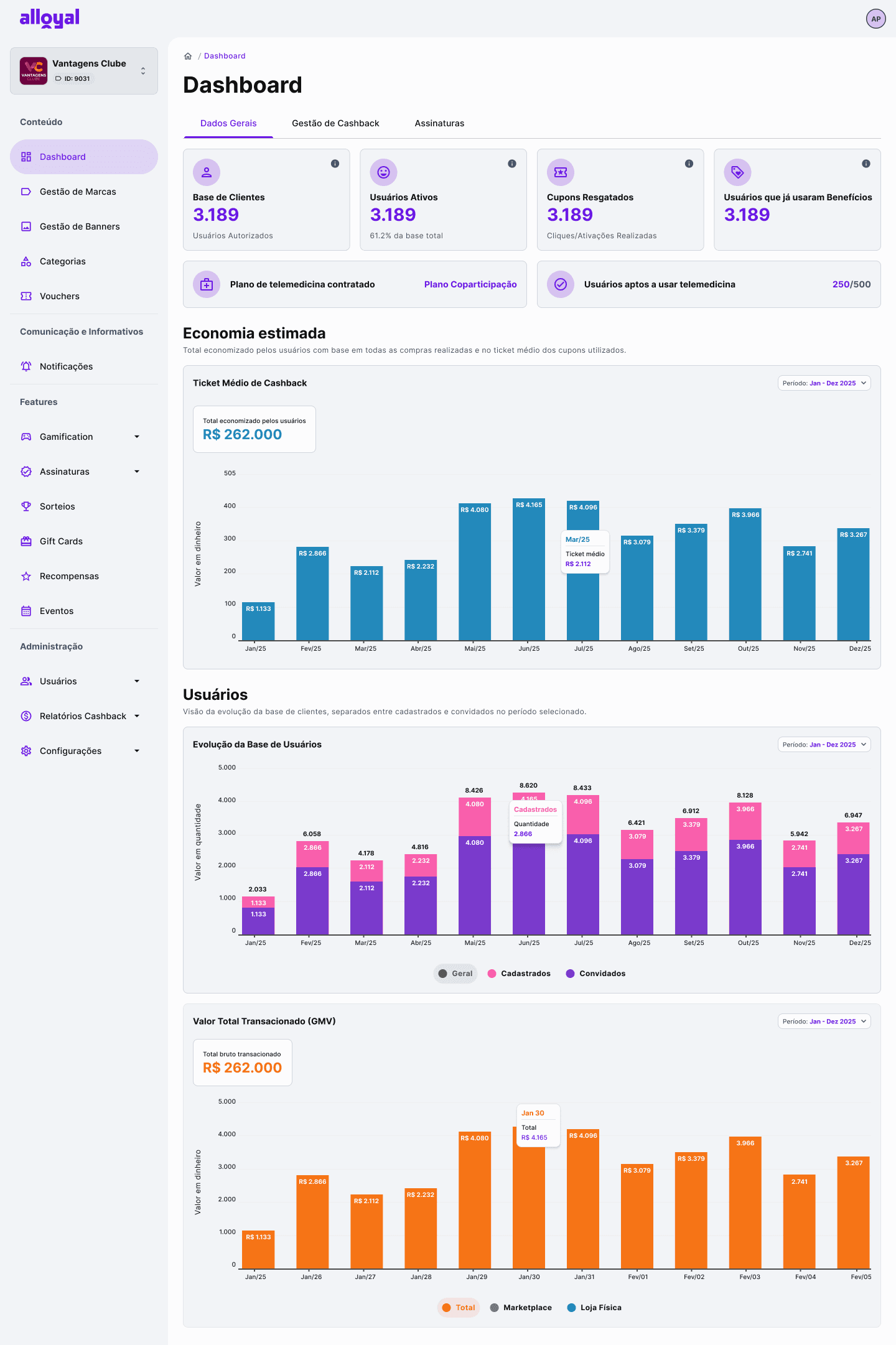
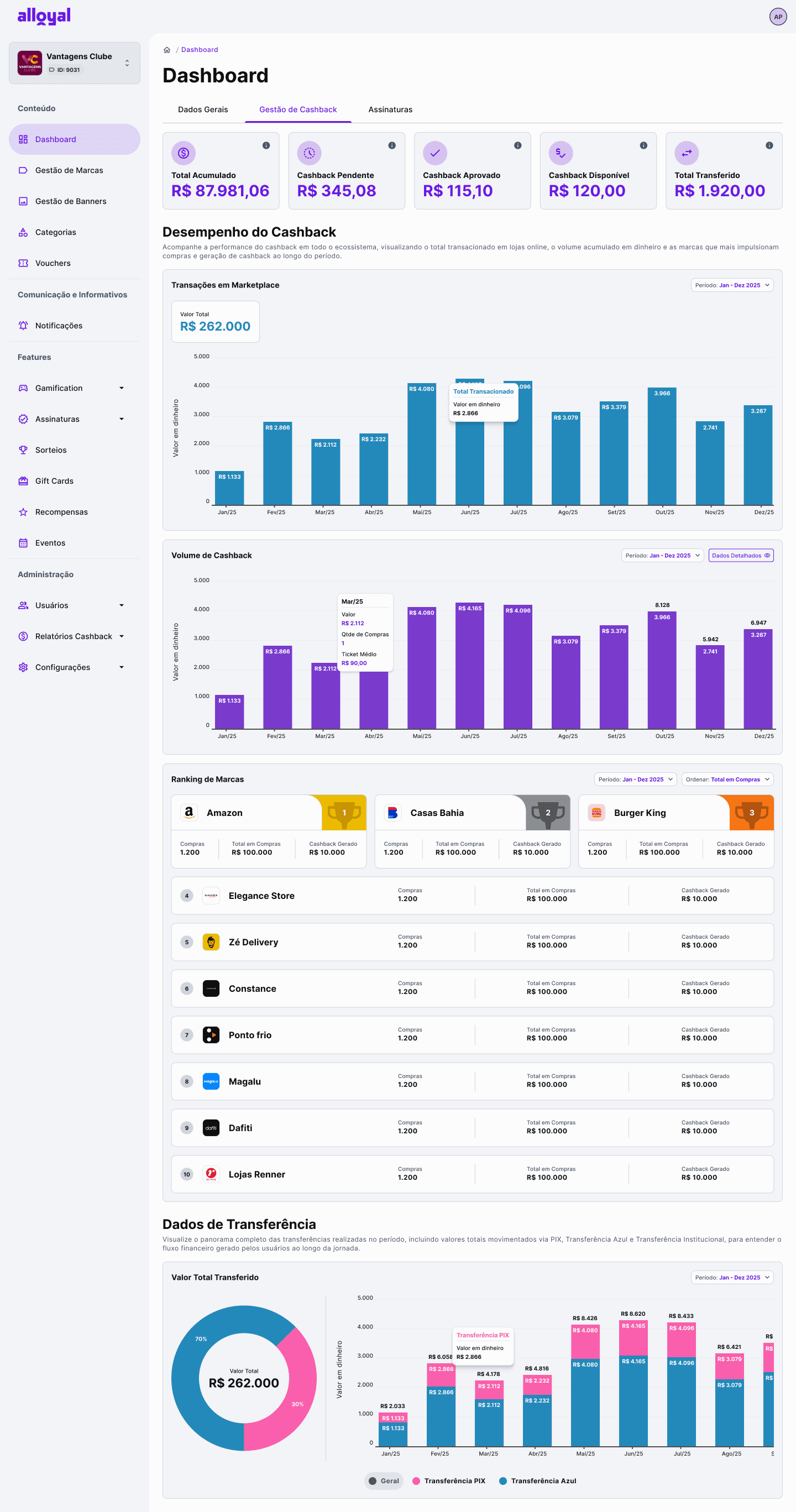
A redesigned experience on three pillars
A redesigned dashboard experience based on three pillars:


DESIGN SYSTEM
The case for building the DS before shipping the dashboard
The redesign wasn't a single screen — it was three interconnected dashboard domains (Subscriptions, Points, Cashback), all part of a broader admin panel rebranding. Without a shared foundation, each domain would inevitably drift: different chart styles, inconsistent card layouts, varying empty states. That fragmentation would have directly undermined the "reliable and trustworthy" perception we were trying to rebuild.

The DS was also the backbone of the rebranding itself. Alloyal needed the admin panel to feel modern and trustworthy — not just the dashboard, but the entire product surface clients interact with. A shared system made that consistent upgrade possible without having to redesign every screen from scratch.
The case for building the DS before shipping the dashboard
0
0
Components built and documented
0
0
Chart types standardized across all domains
0
0
System states defined: error, empty, loading, partial data
-0%
-0%
Reduction in design time for the Cashback domain (second to ship)
0
0
Dashboard domains sharing a single component library
1
1
Figma library as the shared source of truth with Engineering
The system standardized typography, spacing, color usage, chart patterns, and all interface states. Engineering had a single reference point, eliminating the class of issues where the same component looks different across screens. The DS evolved from a UI deliverable into the structural foundation of a more mature, coherent product.

RESULTS
Outcomes across three audiences
FOR CLIENTS
CS calls
Clients reported answering program questions independently
Clients reported answering program questions independently
Trust
Increased confidence in platform data, fewer escalations
FOR INTERNAL TEAMS
Tickets
Significant reduction in dashboard-related data correction requests
Looker
CS no longer needs external tools for most client data queries
FOR THE PRODUCT
Strategic
Dashboard repositioned from support tool to product feature
Dashboard repositioned from support tool to product feature
Scalable
DS foundation supports expansion to new analytics modules
Feedback
In their words
• “We significantly reduced the number of tickets related to data inconsistencies.” • “Clients are asking fewer questions about basic metrics — conversations are now more strategic.” • “We no longer need to rely on Looker for most client requests, which saves time and reduces context switching.”

CS Team
• “This is the first time the dashboard is being used as a product feature, not just a support tool.” • “The Design System helped us move faster and maintain consistency across new dashboard modules.” • “We now have a scalable foundation to expand analytics across other products.”

Product Team
Key Learnings
What this project reinforced
.1
Reliable data matters more than visuals
The biggest design problem here wasn't the UI — it was the underlying data quality. No amount of visual refinement would have fixed a dashboard that was telling users the wrong numbers. Discovery has to include the data layer, not just the interface.
.2
Dashboards are decision-making tools, not visualizations
The question isn't "does this chart look good?" but "does this help someone take action?" Every design decision was evaluated against whether it helped a client decide something about their loyalty program, not whether it was aesthetically interesting.
.3
A Design System is product infrastructure, not a UI kit
The DS unlocked speed and consistency, but its real value was enabling the white-label environment to scale without fragmentation. Treat it as an engineering investment with a design face — and make that argument to stakeholders with concrete numbers.
.4
Centralizing data reduces operational cost
Every ticket CS received was a cost — in time, context switching, and eroded client trust. Design that enables self-service has a measurable business impact. Framing the redesign this way helped align PM, CS leadership, and engineering around the same priority.
Retrospective
What I'd do differently
Looking back after the launch and the first months of adoption, a few things stand out as areas where I'd make different calls today.
What worked well
Running the metric audit before designing anything. It was tempting to start with wireframes, but spending time in the data layer first saved us from shipping a prettier version of the same broken experience.
Building the DS in parallel with the dashboard. The initial investment paid off immediately on the second domain (Cashback) which shipped in half the expected time.
Using CS as a research partner, not just a stakeholder. Their institutional knowledge of client pain points was the most valuable input in discovery.
What I'd change
Involve engineering earlier in metric definition. The calculation logic changes surfaced late in development, pushing launch by two sprints. I'd run a technical feasibility session in the discovery phase.
Set up quantitative baseline metrics before launch. We didn't have a clear pre-launch ticket count or Looker usage baseline, which made it harder to quantify the impact afterward. I'd instrument that from the start.
Test with more client archetypes. We had 5 clients in research — all HR managers at mid-to-large companies. I'd have recruited at least one small company and one from a different vertical to stress-test the IA assumptions.
More Projects
More Projects

UI / UX Design
Dashboard Redesign
What happens when the platform’s most important dashboard is no longer trusted by its users? This case explores the redesign of an admin dashboard that struggled with low adoption, fragmented information, and operational dependency. As part of a broader product rebranding initiative, the challenge was not only to modernize the experience but also to rebuild confidence in data, improve decision-making, and create a scalable foundation for future growth. From discovery to implementation, this project demonstrates how strategic design can transform a dashboard from a neglected feature into a valuable business tool.
Year :
2024
Industry :
Tech
Client :
Alloyal
Project Duration :
2 Years
Context & My Role
Where I fit in
Alloyal is a B2B loyalty platform that manages subscriptions, points programs, or cashback for corporate clients across Brazil. The admin panel is the primary interface for client companies to track their program's performance, effectively the main product touchpoint for decision-makers on the client side.
MY ROLE
Lead Product Designer, sole designer on the dashboard track, working directly with the PM and two engineers.
Collaborators
Product Manager · 2 Engineers · Customer Success team (5 CSMs) · Data team (for metric validation)
My Scope
Discovery · Information Architecture · UI Design · Design System · Handoff & QA
The redesign was part of a broader admin panel rebranding initiative. I was responsible for the end-to-end design process, from running research sessions to delivering production-ready components through a Design System I created from scratch.
Problem
A dashboard no one trusted
The initial analysis revealed five critical and interconnected failure points. The problems weren't isolated, they formed a cascade: metric errors eroded trust, which drove users away, which pushed volume to Customer Success, which leaned on external tools to compensate.
THE CORE Insight:
Clients weren't lazy, they were rational. When a tool can't be trusted, people route around it. Every ticket to CS was evidence of a design failure, not a user failure.
Goal
Reposition the dashboard as a product asset
The redesign had a clear strategic intent: make the dashboard something clients chose to use because it made them better at their jobs, not a feature they tolerated.
Single source of truth
Eliminate data discrepancies between the dashboard and CS reports
Self-service tool
Clients should be able to answer their own data questions without calling CS
Reduce CS load
Free up Customer Success from reactive data support to strategic conversations
Scalable foundation
Design System as infrastructure to support future analytics expansion
Single source of truth
Eliminate data discrepancies between the dashboard and CS reports
Reduce CS load
Free up Customer Success from reactive data support to strategic conversations
Self-service tool
Clients should be able to answer their own data questions without calling CS
Scalable foundation
Design System as infrastructure to support future analytics expansion
Dashboard Old version
Discovery
Understanding where trust broke down
Before touching any layout or component, I needed to understand exactly where the data pipeline was failing and how that shaped user behavior. I ran a three-pronged discovery over three weeks.
Method 01 · Stakeholder interviews
CS team deep-dive
Interviewed 4 Customer Success Managers individually. Asked them to walk me through a typical client data request: what was asked, what they had to look up, why they couldn't point the client to the dashboard.
"I open Looker first because I know the numbers there are right. Then I open the dashboard to show the client where to find things later, but I know the numbers won't match."
— CSM, interviewed in discovery
Method 02 · Client sessions
5 client interviews
Recruited 5 active B2B clients (HR managers at mid-to-large companies) for 45-minute sessions. Observed them trying to answer real business questions using the existing dashboard. Tracked where they got stuck, what they expected to find, and when they gave up.
"I wanted to know how many points were about to expire this month. I couldn't find it, so I sent a WhatsApp to our account manager."
— Client, HR Manager at a retail company
Method 03 · Data cross-check
Metric audit with the data team
Together with a data analyst, I mapped every metric shown in the dashboard against its calculation logic and compared it to the equivalent in Looker. Found 7 discrepancies — 3 were critical (churn rate, active subscriber count, cashback utilization rate).
Key Finding
The biggest discrepancy was in how "active subscriber" was defined. The dashboard counted any subscription created in the period; Looker counted only those with at least one transaction. A ~30% difference in the same number.
Method 04 · Ticket analysis
Support ticket categorization
Analyzed 3 months of CS tickets tagged as "dashboard" or "data question." Categorized them by topic and mapped them to specific screens. This gave me a prioritization map: which data gaps or errors caused the most friction.
The top 3 ticket drivers were
Churn interpretation (34%), points expiration visibility (28%), cashback reconciliation (21%).
Discovery output:
A prioritized list of metric inconsistencies, a map of the most-requested data not available in the dashboard, and a clear picture of the two main user journeys (client reviewing program health vs. CS preparing a client report). These became the backbone of the IA redesign.
Approach
Five bets we made
1
Data validation with real stakeholders
Cross-checked every metric with the CS team and data team before redesigning anything. Redefined calculation logic for the 3 critical metrics in collaboration with engineering.
→ Outcome: clear metric definitions agreed upon across CS, Product, and Engineering
2
Information architecture redesign by product domain
Reorganized the dashboard around three product domains (Subscriptions, Points, Cashback) with a clear separation between strategic KPIs and operational data. Applied progressive disclosure: overview → details.
→ Outcome: clients could navigate to their specific area without scanning the entire screen
3
Expanded data coverage per domain
Added dedicated dashboards for each domain addressing the top ticket drivers: churn relative to active base (not absolute), points expiration timeline, cashback reconciliation view.
→ Outcome: the three top ticket categories now have self-service answers in the product
4
Client autonomy features
Added CSV export, period comparison controls, and contextual tooltips explaining metric definitions. The goal was to reduce the need to call CS even for edge cases.
→ Outcome: clients can now run their own ad-hoc analysis without CS involvement
5
Design System as the rebranding backbone
Created a dedicated Design System to ensure consistency across all three dashboard domains and the white-label environment. Standardized components, chart styles, typography, and all states (error, empty, loading).
→ Outcome: new dashboard modules now take ~40% less design time due to reusable foundations
Key Design Decisions
Three decisions that shaped the outcome
These weren't obvious calls, each one involved a trade-off and a choice that could have gone differently. Here's the reasoning behind the ones that mattered most.
DECISION 01
Show churn as % of active base, not as an absolute number
ALTERNATIVES CONSIDERED
DISCARDED
Absolute churn count
DISCARDED
Period-over-period delta only
WHY WE CHOSE THIS
Clients with 500 subs and 50 churned read it differently than those with 5,000 and 50 churned. The % framing made the same number actionable regardless of program size, and matched how clients actually talked about their business in interviews.
DECISION 02
Domain-first navigation (Subscriptions · Points · Cashback) over a unified overview
ALTERNATIVES CONSIDERED
DISCARDED
Single scrollable dashboard
DISCARDED
Tab-based all-metrics view
WHY WE CHOSE THIS
Discovery showed clients were product-specific: an HR manager running a points program didn’t care about cashback metrics. A unified view forced them to visually filter every time. Domain-first reduced cognitive load and made the page feel relevant to each persona from the first click.
DECISION 03
Build the Design System before shipping the dashboard, not after
ALTERNATIVES CONSIDERED
DISCARDED
Ship dashboard first, DS later
DISCARDED
Adopt an existing open-source system
WHY WE CHOSE THIS
Three domains shipping without a shared foundation would inevitably drift, undermining the consistent, reliable perception we needed to rebuild. Doing the DS first also paid off immediately: the Cashback domain shipped ~40% faster. I mapped that gain against the 3-week investment and the PM aligned.
SOLUTION
A redesigned experience on three pillars
A redesigned dashboard experience based on three pillars:
DESIGN SYSTEM
The case for building the DS before shipping the dashboard
The redesign wasn't a single screen — it was three interconnected dashboard domains (Subscriptions, Points, Cashback), all part of a broader admin panel rebranding. Without a shared foundation, each domain would inevitably drift: different chart styles, inconsistent card layouts, varying empty states. That fragmentation would have directly undermined the "reliable and trustworthy" perception we were trying to rebuild.
The DS was also the backbone of the rebranding itself. Alloyal needed the admin panel to feel modern and trustworthy — not just the dashboard, but the entire product surface clients interact with. A shared system made that consistent upgrade possible without having to redesign every screen from scratch.
The case for building the DS before shipping the dashboard
0
0
Components built and documented
0
0
Chart types standardized across all domains
0
0
System states defined: error, empty, loading, partial data
-0%
-0%
Reduction in design time for the Cashback domain (second to ship)
0
0
Dashboard domains sharing a single component library
1
1
Figma library as the shared source of truth with Engineering
The system standardized typography, spacing, color usage, chart patterns, and all interface states. Engineering had a single reference point, eliminating the class of issues where the same component looks different across screens. The DS evolved from a UI deliverable into the structural foundation of a more mature, coherent product.
RESULTS
Outcomes across three audiences
FOR CLIENTS
CS calls
Clients reported answering program questions independently
Clients reported answering program questions independently
Trust
Increased confidence in platform data, fewer escalations
FOR INTERNAL TEAMS
Tickets
Significant reduction in dashboard-related data correction requests
Looker
CS no longer needs external tools for most client data queries
FOR THE PRODUCT
Strategic
Dashboard repositioned from support tool to product feature
Dashboard repositioned from support tool to product feature
Scalable
DS foundation supports expansion to new analytics modules
Feedback
In their words
• “We significantly reduced the number of tickets related to data inconsistencies.” • “Clients are asking fewer questions about basic metrics — conversations are now more strategic.” • “We no longer need to rely on Looker for most client requests, which saves time and reduces context switching.”
CS Team
• “This is the first time the dashboard is being used as a product feature, not just a support tool.” • “The Design System helped us move faster and maintain consistency across new dashboard modules.” • “We now have a scalable foundation to expand analytics across other products.”
Product Team
Key Learnings
What this project reinforced
.1
Reliable data matters more than visuals
The biggest design problem here wasn't the UI — it was the underlying data quality. No amount of visual refinement would have fixed a dashboard that was telling users the wrong numbers. Discovery has to include the data layer, not just the interface.
.2
Dashboards are decision-making tools, not visualizations
The question isn't "does this chart look good?" but "does this help someone take action?" Every design decision was evaluated against whether it helped a client decide something about their loyalty program, not whether it was aesthetically interesting.
.3
A Design System is product infrastructure, not a UI kit
The DS unlocked speed and consistency, but its real value was enabling the white-label environment to scale without fragmentation. Treat it as an engineering investment with a design face — and make that argument to stakeholders with concrete numbers.
.4
Centralizing data reduces operational cost
Every ticket CS received was a cost — in time, context switching, and eroded client trust. Design that enables self-service has a measurable business impact. Framing the redesign this way helped align PM, CS leadership, and engineering around the same priority.
Retrospective
What I'd do differently
Looking back after the launch and the first months of adoption, a few things stand out as areas where I'd make different calls today.
What worked well
Running the metric audit before designing anything. It was tempting to start with wireframes, but spending time in the data layer first saved us from shipping a prettier version of the same broken experience.
Building the DS in parallel with the dashboard. The initial investment paid off immediately on the second domain (Cashback) which shipped in half the expected time.
Using CS as a research partner, not just a stakeholder. Their institutional knowledge of client pain points was the most valuable input in discovery.
What I'd change
Involve engineering earlier in metric definition. The calculation logic changes surfaced late in development, pushing launch by two sprints. I'd run a technical feasibility session in the discovery phase.
Set up quantitative baseline metrics before launch. We didn't have a clear pre-launch ticket count or Looker usage baseline, which made it harder to quantify the impact afterward. I'd instrument that from the start.
Test with more client archetypes. We had 5 clients in research — all HR managers at mid-to-large companies. I'd have recruited at least one small company and one from a different vertical to stress-test the IA assumptions.
More Projects
More Projects
UI / UX Design
Dashboard Redesign
What happens when the platform’s most important dashboard is no longer trusted by its users? This case explores the redesign of an admin dashboard that struggled with low adoption, fragmented information, and operational dependency. As part of a broader product rebranding initiative, the challenge was not only to modernize the experience but also to rebuild confidence in data, improve decision-making, and create a scalable foundation for future growth. From discovery to implementation, this project demonstrates how strategic design can transform a dashboard from a neglected feature into a valuable business tool.
Year :
2024
Industry :
Tech
Client :
Alloyal
Project Duration :
2 Years
Context & My Role
Where I fit in
Alloyal is a B2B loyalty platform that manages subscriptions, points programs, or cashback for corporate clients across Brazil. The admin panel is the primary interface for client companies to track their program's performance, effectively the main product touchpoint for decision-makers on the client side.
MY ROLE
Lead Product Designer, sole designer on the dashboard track, working directly with the PM and two engineers.
Collaborators
Product Manager · 2 Engineers · Customer Success team (5 CSMs) · Data team (for metric validation)
My Scope
Discovery · Information Architecture · UI Design · Design System · Handoff & QA
The redesign was part of a broader admin panel rebranding initiative. I was responsible for the end-to-end design process, from running research sessions to delivering production-ready components through a Design System I created from scratch.
Problem
A dashboard no one trusted
The initial analysis revealed five critical and interconnected failure points. The problems weren't isolated, they formed a cascade: metric errors eroded trust, which drove users away, which pushed volume to Customer Success, which leaned on external tools to compensate.
THE CORE Insight:
Clients weren't lazy, they were rational. When a tool can't be trusted, people route around it. Every ticket to CS was evidence of a design failure, not a user failure.
Goal
Reposition the dashboard as a product asset
The redesign had a clear strategic intent: make the dashboard something clients chose to use because it made them better at their jobs, not a feature they tolerated.
Single source of truth
Eliminate data discrepancies between the dashboard and CS reports
Self-service tool
Clients should be able to answer their own data questions without calling CS
Reduce CS load
Free up Customer Success from reactive data support to strategic conversations
Scalable foundation
Design System as infrastructure to support future analytics expansion
Single source of truth
Eliminate data discrepancies between the dashboard and CS reports
Reduce CS load
Free up Customer Success from reactive data support to strategic conversations
Self-service tool
Clients should be able to answer their own data questions without calling CS
Scalable foundation
Design System as infrastructure to support future analytics expansion
Dashboard Old version
Discovery
Understanding where trust broke down
Before touching any layout or component, I needed to understand exactly where the data pipeline was failing and how that shaped user behavior. I ran a three-pronged discovery over three weeks.
Method 01 · Stakeholder interviews
CS team deep-dive
Interviewed 4 Customer Success Managers individually. Asked them to walk me through a typical client data request: what was asked, what they had to look up, why they couldn't point the client to the dashboard.
"I open Looker first because I know the numbers there are right. Then I open the dashboard to show the client where to find things later, but I know the numbers won't match."
— CSM, interviewed in discovery
Method 02 · Client sessions
5 client interviews
Recruited 5 active B2B clients (HR managers at mid-to-large companies) for 45-minute sessions. Observed them trying to answer real business questions using the existing dashboard. Tracked where they got stuck, what they expected to find, and when they gave up.
"I wanted to know how many points were about to expire this month. I couldn't find it, so I sent a WhatsApp to our account manager."
— Client, HR Manager at a retail company
Method 03 · Data cross-check
Metric audit with the data team
Together with a data analyst, I mapped every metric shown in the dashboard against its calculation logic and compared it to the equivalent in Looker. Found 7 discrepancies — 3 were critical (churn rate, active subscriber count, cashback utilization rate).
Key Finding
The biggest discrepancy was in how "active subscriber" was defined. The dashboard counted any subscription created in the period; Looker counted only those with at least one transaction. A ~30% difference in the same number.
Method 04 · Ticket analysis
Support ticket categorization
Analyzed 3 months of CS tickets tagged as "dashboard" or "data question." Categorized them by topic and mapped them to specific screens. This gave me a prioritization map: which data gaps or errors caused the most friction.
The top 3 ticket drivers were
Churn interpretation (34%), points expiration visibility (28%), cashback reconciliation (21%).
Discovery output:
A prioritized list of metric inconsistencies, a map of the most-requested data not available in the dashboard, and a clear picture of the two main user journeys (client reviewing program health vs. CS preparing a client report). These became the backbone of the IA redesign.
Approach
Five bets we made
1
Data validation with real stakeholders
Cross-checked every metric with the CS team and data team before redesigning anything. Redefined calculation logic for the 3 critical metrics in collaboration with engineering.
→ Outcome: clear metric definitions agreed upon across CS, Product, and Engineering
2
Information architecture redesign by product domain
Reorganized the dashboard around three product domains (Subscriptions, Points, Cashback) with a clear separation between strategic KPIs and operational data. Applied progressive disclosure: overview → details.
→ Outcome: clients could navigate to their specific area without scanning the entire screen
3
Expanded data coverage per domain
Added dedicated dashboards for each domain addressing the top ticket drivers: churn relative to active base (not absolute), points expiration timeline, cashback reconciliation view.
→ Outcome: the three top ticket categories now have self-service answers in the product
4
Client autonomy features
Added CSV export, period comparison controls, and contextual tooltips explaining metric definitions. The goal was to reduce the need to call CS even for edge cases.
→ Outcome: clients can now run their own ad-hoc analysis without CS involvement
5
Design System as the rebranding backbone
Created a dedicated Design System to ensure consistency across all three dashboard domains and the white-label environment. Standardized components, chart styles, typography, and all states (error, empty, loading).
→ Outcome: new dashboard modules now take ~40% less design time due to reusable foundations
Key Design Decisions
Three decisions that shaped the outcome
These weren't obvious calls, each one involved a trade-off and a choice that could have gone differently. Here's the reasoning behind the ones that mattered most.
DECISION 01
Show churn as % of active base, not as an absolute number
ALTERNATIVES CONSIDERED
DISCARDED
Absolute churn count
DISCARDED
Period-over-period delta only
WHY WE CHOSE THIS
Clients with 500 subs and 50 churned read it differently than those with 5,000 and 50 churned. The % framing made the same number actionable regardless of program size, and matched how clients actually talked about their business in interviews.
DECISION 02
Domain-first navigation (Subscriptions · Points · Cashback) over a unified overview
ALTERNATIVES CONSIDERED
DISCARDED
Single scrollable dashboard
DISCARDED
Tab-based all-metrics view
WHY WE CHOSE THIS
Discovery showed clients were product-specific: an HR manager running a points program didn’t care about cashback metrics. A unified view forced them to visually filter every time. Domain-first reduced cognitive load and made the page feel relevant to each persona from the first click.
DECISION 03
Build the Design System before shipping the dashboard, not after
ALTERNATIVES CONSIDERED
DISCARDED
Ship dashboard first, DS later
DISCARDED
Adopt an existing open-source system
WHY WE CHOSE THIS
Three domains shipping without a shared foundation would inevitably drift, undermining the consistent, reliable perception we needed to rebuild. Doing the DS first also paid off immediately: the Cashback domain shipped ~40% faster. I mapped that gain against the 3-week investment and the PM aligned.
SOLUTION
A redesigned experience on three pillars
A redesigned dashboard experience based on three pillars:
DESIGN SYSTEM
The case for building the DS before shipping the dashboard
The redesign wasn't a single screen — it was three interconnected dashboard domains (Subscriptions, Points, Cashback), all part of a broader admin panel rebranding. Without a shared foundation, each domain would inevitably drift: different chart styles, inconsistent card layouts, varying empty states. That fragmentation would have directly undermined the "reliable and trustworthy" perception we were trying to rebuild.
The DS was also the backbone of the rebranding itself. Alloyal needed the admin panel to feel modern and trustworthy — not just the dashboard, but the entire product surface clients interact with. A shared system made that consistent upgrade possible without having to redesign every screen from scratch.
The case for building the DS before shipping the dashboard
0
0
Components built and documented
0
0
Chart types standardized across all domains
0
0
System states defined: error, empty, loading, partial data
-0%
-0%
Reduction in design time for the Cashback domain (second to ship)
0
0
Dashboard domains sharing a single component library
1
1
Figma library as the shared source of truth with Engineering
The system standardized typography, spacing, color usage, chart patterns, and all interface states. Engineering had a single reference point, eliminating the class of issues where the same component looks different across screens. The DS evolved from a UI deliverable into the structural foundation of a more mature, coherent product.
RESULTS
Outcomes across three audiences
FOR CLIENTS
CS calls
Clients reported answering program questions independently
Clients reported answering program questions independently
Trust
Increased confidence in platform data, fewer escalations
FOR INTERNAL TEAMS
Tickets
Significant reduction in dashboard-related data correction requests
Looker
CS no longer needs external tools for most client data queries
FOR THE PRODUCT
Strategic
Dashboard repositioned from support tool to product feature
Dashboard repositioned from support tool to product feature
Scalable
DS foundation supports expansion to new analytics modules
Feedback
In their words
• “We significantly reduced the number of tickets related to data inconsistencies.” • “Clients are asking fewer questions about basic metrics — conversations are now more strategic.” • “We no longer need to rely on Looker for most client requests, which saves time and reduces context switching.”
CS Team
• “This is the first time the dashboard is being used as a product feature, not just a support tool.” • “The Design System helped us move faster and maintain consistency across new dashboard modules.” • “We now have a scalable foundation to expand analytics across other products.”
Product Team
Key Learnings
What this project reinforced
.1
Reliable data matters more than visuals
The biggest design problem here wasn't the UI — it was the underlying data quality. No amount of visual refinement would have fixed a dashboard that was telling users the wrong numbers. Discovery has to include the data layer, not just the interface.
.2
Dashboards are decision-making tools, not visualizations
The question isn't "does this chart look good?" but "does this help someone take action?" Every design decision was evaluated against whether it helped a client decide something about their loyalty program, not whether it was aesthetically interesting.
.3
A Design System is product infrastructure, not a UI kit
The DS unlocked speed and consistency, but its real value was enabling the white-label environment to scale without fragmentation. Treat it as an engineering investment with a design face — and make that argument to stakeholders with concrete numbers.
.4
Centralizing data reduces operational cost
Every ticket CS received was a cost — in time, context switching, and eroded client trust. Design that enables self-service has a measurable business impact. Framing the redesign this way helped align PM, CS leadership, and engineering around the same priority.
Retrospective
What I'd do differently
Looking back after the launch and the first months of adoption, a few things stand out as areas where I'd make different calls today.
What worked well
Running the metric audit before designing anything. It was tempting to start with wireframes, but spending time in the data layer first saved us from shipping a prettier version of the same broken experience.
Building the DS in parallel with the dashboard. The initial investment paid off immediately on the second domain (Cashback) which shipped in half the expected time.
Using CS as a research partner, not just a stakeholder. Their institutional knowledge of client pain points was the most valuable input in discovery.
What I'd change
Involve engineering earlier in metric definition. The calculation logic changes surfaced late in development, pushing launch by two sprints. I'd run a technical feasibility session in the discovery phase.
Set up quantitative baseline metrics before launch. We didn't have a clear pre-launch ticket count or Looker usage baseline, which made it harder to quantify the impact afterward. I'd instrument that from the start.
Test with more client archetypes. We had 5 clients in research — all HR managers at mid-to-large companies. I'd have recruited at least one small company and one from a different vertical to stress-test the IA assumptions.